Canva Free vs Pro: What the Paid Tier Adds
For social posts, Canva Pro buys four things Free does not have: scheduling posts to connected platforms, five Brand Kits instead of one, 100GB of storage instead of 5GB, and roughly ten times the AI allowance. It is listed at US$144 per year for one person. Everything else about making a post is already in the free tier, per the pricing page checked October 10, 2026.
This article is a documentation review: it is based on the vendors' own published pages, checked on the date shown. We may earn a commission from some links; it never affects what we recommend.
Canva Free already makes finished social posts. The paid Pro tier, listed at US$144 per year for one person on the pricing page checked October 10, 2026, adds four things that matter to anyone publishing regularly: scheduling content to connected platforms, five Brand Kits instead of one, 100GB of storage instead of 5GB, and about ten times the monthly AI allowance. It also unlocks template customization and background removal, which the comparison table marks unavailable on Free. What Pro does not add is a team: the page states that "only one person can use a Canva Pro account." This guide lists each difference that affects social work, with the vendor's own wording.
Start with the prices the page actually shows
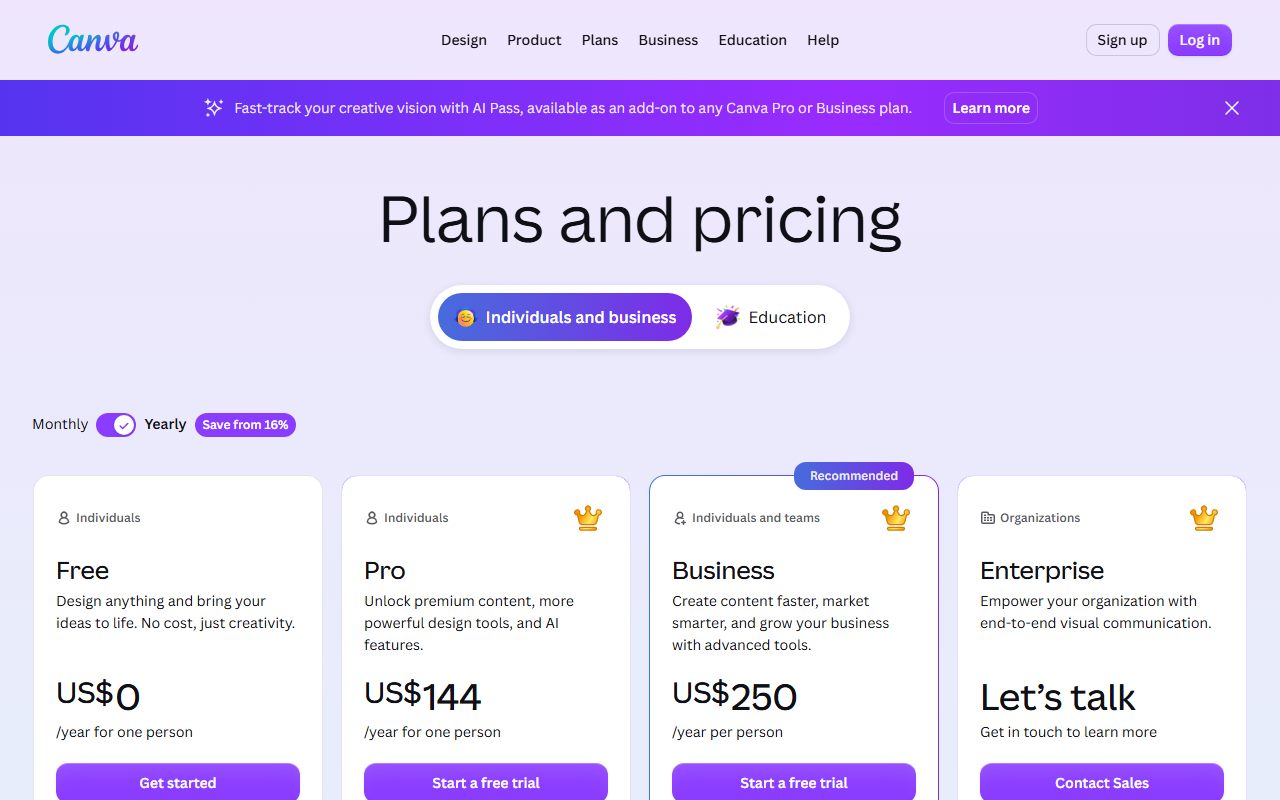
Canva lists four tiers for individuals and business. Free is US$0. Pro is US$144 per year for one person. Business is US$250 per year per person. Enterprise is quote-only, with a "Let's talk" card.
Two honest caveats. The copy we captured on October 10, 2026 rendered the annual toggle, so we quote annual figures only. The Pro card notes "Daily and weekly plan options" without naming a figure.
US$144 per year works out to US$12 per month. That is our arithmetic from the annual price, not a rate Canva publishes on the page.
The page also states that "the prices on this page don't include tax" and that US sales tax is applied by billing address. Canva Business uses what the FAQ calls a "pay-as-you-grow model," charging only for members who accept an invitation.
Scheduling is the one publishing feature behind the paywall
In the comparison table, the row "Schedule social content across platforms" reads Unavailable on Free and Included on Pro. The Pro summary card lists "Social content scheduling" among what you unlock. Canva publishes no number of connected destinations or posts.
That absence matters. A dedicated scheduler states its limits in units you can count, which is why we spend a whole guide on what counts as a channel in a social scheduler. Canva gives a feature tick and no quota.
For a solo creator posting a few times a week, the Pro planner may be enough. For anything with approvals, several brands or a reply workflow, a purpose-built tool is still the publishing layer, as the free-tier limits in Buffer versus Later versus Hootsuite show.
Brand assets and storage are the second real gap
- Brand Kits: 1 on Free, described on the card as "1 Brand Kit (3 colors only)"; 5 on Pro; 100 with approvals on Business.
- Brand Templates and Components: Unavailable on Free, Included on Pro.
- Cloud storage: 5GB on Free, 100GB on Pro, 500GB on Business, 1TB on Enterprise.
- Stock library: "4.7M+ photos, videos, graphics, and audio" on Free against "141M+ premium photos, videos, graphics, and audio" on Pro.
- Templates: "1.6M+" on Free against "3.6M+ templates (including premium)" on Pro.
- Customize templates and Design in bulk: both Unavailable on Free, Included on Pro.
- Export print-ready designs as CMYK: Unavailable on Free, Included on Pro.
The three-colour cap on the free Brand Kit is the quiet one. Teams that keep a logo, two fonts and a palette consistent across nine accounts hit it immediately, and template customization being Pro-only compounds it.
Read the AI allowance carefully, because it is metered
Canva now pools AI use into a monthly allowance shared across Standard, Premium and Ultra tools. The published estimates as of October 10, 2026: Free gets up to 20 uses of Standard or Premium tools, with no Ultra access.
Pro lists up to 200 Premium uses or up to 20 Ultra uses per month. The allowance resets monthly and is pooled across every listed AI tool.
Business and Enterprise both list up to 400 Premium uses or up to 40 Ultra uses. On paid plans, Standard AI tools are marked "No allowance used" with a footnote that "fair use limits apply." On Free they draw from the 20-use pool.
Two details are easy to miss. The page says "AI allowance during trial is the same as Canva Free," so a trial will not show Pro's real ceiling. And the counts are estimates: "higher-tier tools use more of your allowance."
Extra allowance is sold separately. AI Pass is a monthly add-on for Pro and Business offering "40x more AI than Canva Pro," and AI top-ups are a one-time purchase for Business only, valid for 30 days. Neither add-on price appears on the pricing page.
Metered AI is now normal in this stack. Social schedulers meter it too, with Metricool allotting credits per brand and Sprout Social per seat, as set out in Metricool versus Sprout Social pricing.
Pro does not give you a team, and that trips people up
The FAQ is blunt: "Canva Pro is the best plan for solo creators" and "only one person can use a Canva Pro account." In the table, "Invite team members," "Set Brand Controls" and "Get Design Approvals" are Unavailable on both Free and Pro.
Those three rows are the real reason to look at Business at US$250 per year per person. A two-person content team pays US$500 per year there, against US$288 for two separate Pro seats that cannot share a brand library.
Per-person pricing also behaves differently from per-account pricing in a scheduler, where adding an account and adding a person are billed apart, as in Publer versus Buffer paid tiers.
Also worth noting: the FAQ states "Canva Teams is no longer available for new sign-ups or upgrades," and nonprofits can get Pro features plus team tools free "for one team of up to 50 users."
Who can stay on Canva Free
- One brand with one palette, since the free Brand Kit holds three colours.
- Anyone whose posts use their own photography, because the 4.7M-asset free library is only a constraint if you rely on stock.
- Teams that already schedule elsewhere, including on a scheduler's own free tier.
- Light AI users, given the 20-use monthly pool covers occasional caption or image help.
- Workflows where the publishing step is already automated, for example through the run-metered platforms compared in Zapier tasks versus Make credits versus n8n executions.
The opposite case is simple. If you need background removal, bulk design, CMYK exports or more than three brand colours, those are Pro rows in the table and no workaround changes that.
Budget the whole stack rather than one line of it. Design, scheduling and replies are three separate bills, and the third is the one teams forget, as our guide to what a unified social inbox costs sets out.
Frequently asked questions
How much is Canva Pro per year?
US$144 per year for one person, per the plans page checked October 10, 2026, excluding tax. Canva Business is US$250 per year per person. The page we captured rendered annual pricing and did not expose a monthly figure, so we do not quote one.
Can you schedule social posts on Canva Free?
No. The comparison table marks "Schedule social content across platforms" as Unavailable on Free and Included on Pro, as of October 2026. Canva does not publish how many accounts or posts the Pro planner allows.
How much AI do you get on Canva Free?
Up to 20 uses per month of Standard or Premium AI tools, with no access to Ultra AI tools. Canva Pro lists up to 200 Premium uses or up to 20 Ultra uses per month, and calls that roughly ten times the free allowance.
Does Canva Pro work for a two-person team?
No. The FAQ states only one person can use a Canva Pro account, and inviting team members is marked unavailable on both Free and Pro. Canva Business at US$250 per year per person is the first tier with team admin and approvals.
Is background removal free in Canva?
No. "Remove backgrounds from images and videos" is marked Unavailable on Free and shown on Pro as using no AI allowance, subject to fair use limits, per the comparison table as of October 10, 2026.
Does the Canva Pro trial show the full AI allowance?
No. The pricing FAQ states that AI allowance during a trial is the same as Canva Free, and that the full allowance begins when the paid plan starts. Plan the trial around templates and scheduling instead.
Bottom line
Canva Free is a complete post-making tool with three hard edges: one three-colour Brand Kit, 5GB of storage and no scheduling. Pro at US$144 per year removes all three and multiplies the AI allowance tenfold.
It does not make Canva a team tool or a replacement for a scheduler with published quotas, and it cannot lift the network-side publishing caps described in what Instagram and TikTok API limits mean. Figures reflect October 10, 2026 and exclude tax.
Sources
- Canva plans and pricing (US) (checked Oct 10, 2026)
- Canva plans and pricing (checked Oct 10, 2026)